Advanced Settings👑
Role permissions, system fields, soft delete, audit, data ownership — how enabling each one changes generated code behavior, and when to use it.
Advanced settings are a set of enterprise-grade engineering capabilities, available to subscribers (locked on free). Each one, when enabled, directly affects the generated frontend and backend code.
Advanced settings take effect per table: if you configure a system field, then tables containing that field enable the corresponding capability; tables without the field automatically degrade to normal tables and are unaffected. Regenerate code after enabling for it to take effect.
Role permission settings
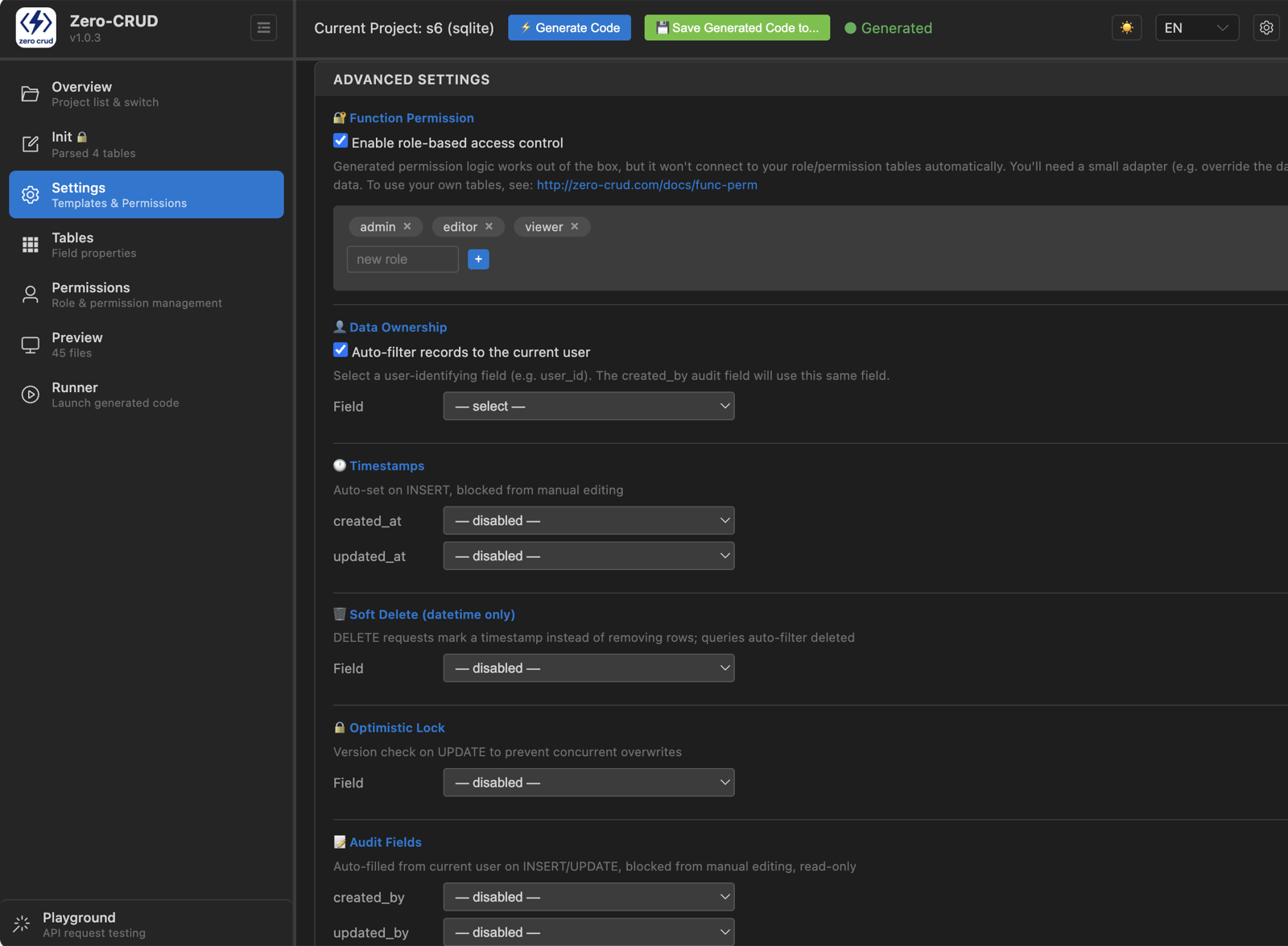
After enabling function permissions, you can configure a role-based permission system:
- Role management:
admin/editor/viewerexist by default, add/remove as needed - Permission configuration: per role — which operations on which tables, which fields are visible, and how data is scoped
- Config is centralized in the generated
permissions.json— edit config and it takes effect, no business-code changes
See Permission Integration for the config entry points and how to wire it up.
Automatic timestamps

What it is: treat created/updated time fields on the table as system fields maintained automatically.
After enabling: when a table has a created_at field, inserts fill it automatically; when it has an updated_at field, updates refresh it automatically. You don’t manage these timestamps in business code.
Good for: almost any business that needs to record time.
Soft delete

What it is: deletes don’t physically remove rows — they set a flag.
After enabling: when a table has a soft-delete marker field (usually named deleted_at), DELETE becomes a flagged delete, and list queries automatically filter out deleted records.
Good for: businesses that need to keep an audit trail or recover data (orders, users, content, etc.).
Optimistic locking

What it is: use a version field to prevent concurrent overwrites.
After enabling: when a table has a version field (usually named version), updates check the version and reject concurrent modifications, avoiding “last write wins over first write”.
Good for: sensitive business where multiple people edit the same record concurrently.
Audit

What it is: record who created and who last modified each row.
After enabling: when a table has audit fields (usually named created_by / updated_by), they’re auto-filled from the current logged-in user, giving you an operator trail.
Good for: businesses that need to know “who changed what”, working together with a login system.
Data ownership

What it is: scope visible data by ownership.
After enabling: designate an ownership field (usually a field identifying the user, like user_id); data is then isolated by owner — a user only sees data that belongs to them.
Good for: multi-user data isolation, personal workspaces.
FAQ
- Why are advanced settings grayed out? Locked on the free tier — upgrade the subscription to unlock.
- Regenerate after enabling? Yes. These settings only land in the output when you generate code.
- Will system fields show up in my business queries? Tables that have the field will, and they’re maintained automatically — you don’t write them manually. Tables without the field won’t have them at all.