Playground Usage
Send requests straight to the generated API and see responses — no frontend code needed. One-click export to Postman / cURL / OpenAPI.
Playground is a built-in HTTP testing tool that lets you verify your generated APIs without writing a frontend. It preloads every endpoint for each table — pick an endpoint, fill in parameters, send, done. After verification you can one-click export the whole API set as a Postman Collection, cURL / Fetch scripts, or an OpenAPI Schema, ready for integration handoff.
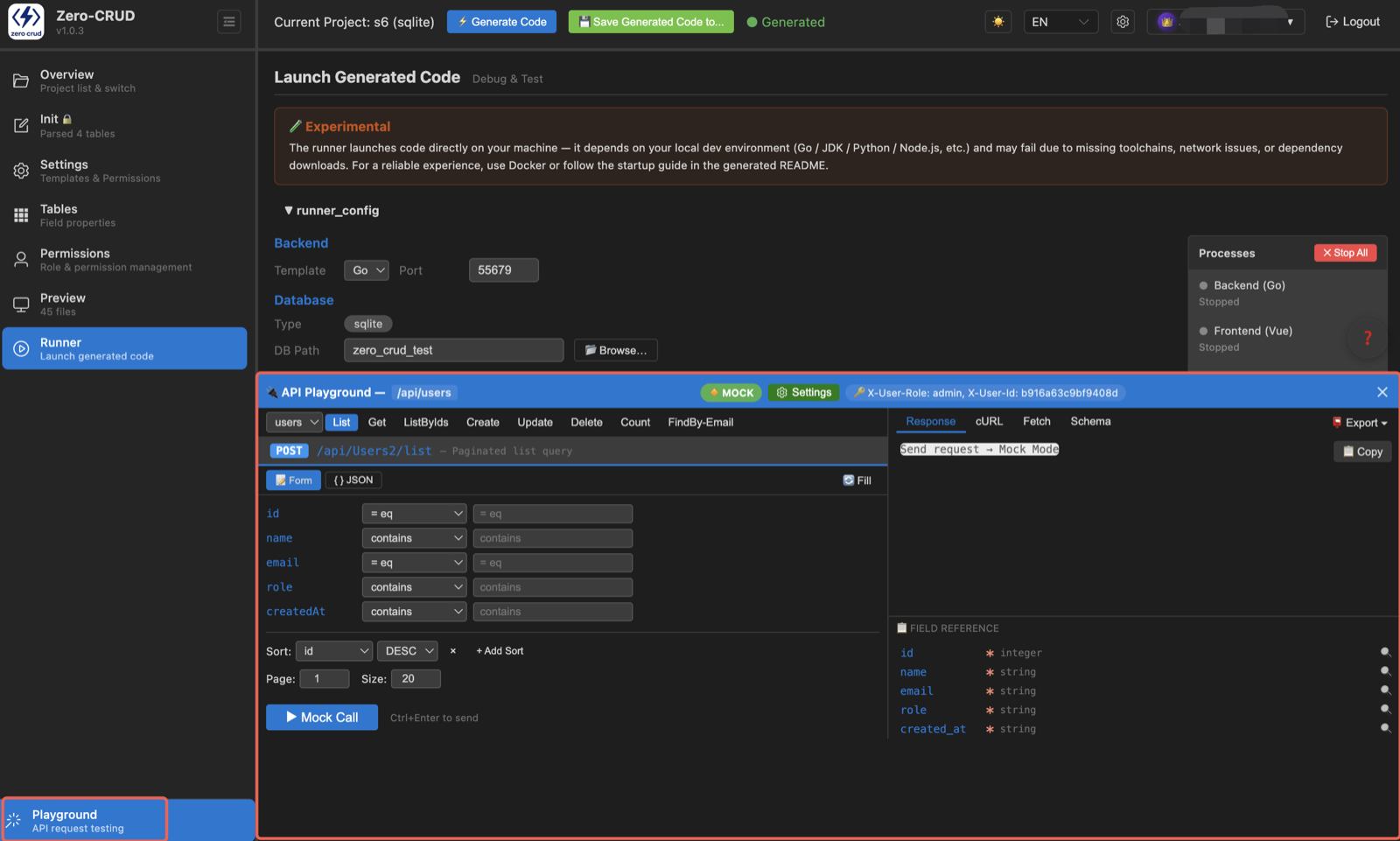
Preloaded endpoints
Every table automatically generates these endpoints:
| Endpoint | Method | Path | Description |
|---|---|---|---|
| List | POST | /list | paged conditional query |
| Get | GET | /{id} | query by ID |
| ListByIds | POST | /listByIds | batch query by IDs |
| Create | POST | / | batch insert |
| Update | PUT | /{id} | update by ID |
| Delete | DELETE | /{id} | delete by ID |
| Count | POST | /count | conditional count |
In addition, fields marked unique (non-PK) automatically generate a matching FindBy-{field} endpoint (GET /by-{field}/{value}) that queries exactly by that unique field — e.g. if email is unique, there’s a FindBy-Email.
These endpoints map one-to-one onto the generated REST API — get familiar with them and frontend integration becomes predictable.
How to use it
- Pick an endpoint: choose one in the list (e.g.
CreateorList) - Fill in parameters: which fields are writable is decided by the table’s insertable/updatable attributes; fill in path params (ID) when needed
- Add headers / body: customize request headers or edit the request-body JSON as needed
- Send: click Send; below, response status and body stream in real time

A complete example
Using the users table:
- Pick
Create, enter{"name": "Jane", "email": "j@example.com"} - Send → returns success plus the record ID
- Pick
List, Send → returns the paged list, where you can see the just-inserted row
That’s an “insert → query” loop verified end to end — no frontend code involved.
Export the API
One-click export of the whole API set — handy for integration, sharing, or importing into API tools. Click the Export button in the top-right and choose a format:
| Export | Filename | Use |
|---|---|---|
| 📮 Postman Collection | postman-collection.json | import into Postman, test endpoints one by one |
| 💻 cURL script | api-curl.sh | command-line request scripts for quick terminal checks |
| 📦 Fetch script | api-fetch.js | frontend fetch call examples you can copy into a project |
| 📐 OpenAPI Schema | openapi.json | standard OpenAPI description — import into other API tools or generate clients |
The export covers every preloaded endpoint for each table: List / Get / ListByIds / Create / Update / Delete / Count, plus FindBy queries for unique fields. Request URLs default to a locally running backend (localhost:3000) — adjust after importing.
Export is an endpoint inventory + call examples; which fields each endpoint actually returns still follows table config and permissions (see Permission Integration).
Tips
List/Countsupport conditional filtering: combine filter conditions, comparison operators, ranges, and nested conditions in the request body- Fields each endpoint returns are affected by table config and permission settings (see Permission Integration)